Saturday, 1 September 2018

My IBSC Journey - Pre-Conference Tasks

Action research is a classroom-based or school-based approach to research. It empowers teachers because it is done by teachers for themselves. Teachers are able to study their own classrooms and in doing so are able to better understand them and are able to improve their quality or effectiveness. Action research enables teachers to focus on what they are interested in which gives them the opportunity to engage in personal, professional and educational reflection. For these reasons and so many more, I am thrilled to be a member of the 2018/2019 IBSC Action Research Cohort. 

Fifty-four participants from Australia, New Zealand, UK, India, Canada, USA and South Africa make up the 41 research projects in the 2018/2019 IBSC Action Research Cohort. These projects are managed by 4 team advisors. Catherine Steenhoff is my research partner and Trish Cislak is our team advisor. Team Trish is known as "The Long & Short of It". 

Me, Trish Cislak and Catherine Steenhoff.

All cohort members were involved in pre-conference tasks before we met at the 2018 IBSC Annual Conference at The Southport School in Australia. The introductory activity involved cohort members uploading a photo and short biography of themselves or their team. 

Task One was designed to help cohort members feel more comfortable using the different technologies needed to communicate during the programme. It was called "The Amazing Race" and was a race to see who could finish the tasks first. Tasks included writing a 6 Word Story describing yourself or your team, creating and sharing a Google document, Facebook activities, creating Skype contacts, joining a WhatsApp group, accessing the IBSC Member Centre, reading past Action Research Reports and completing a Google Form. Jacob Geiger, a fellow Team Trish member, won the race. 

Our 6 Word Story

Task Two was a theory assignment and involved reading various website pages and the prescribed text, Mertler, C.A. (2017). Action Research: Improving Schools and Empowering Educators (5th Edn). New York: Sage Publishing. It was aimed at strengthening our knowledge as researchers so that we would have a solid understanding of the theory of action research.


Task Three focused on the research topic, Boys and Stories: Pathways to Learning. We had to source two relevant journal articles and write an annotated bibliography on each article making use of APA referencing and following the IBSC Style Guidelines. 

Once all these tasks were completed we were ready to meet in Australia for the 2018 IBSC Annual Conference at The Southport School. 

Wednesday, 29 August 2018

My IBSC Journey - The Application


When my headmaster, Rob Macaulay, returned from the 2017 IBSC Annual Conference at The Boys' Latin School of Maryland in Baltimore, Maryland, United States, he reported back on the Action Research Programme. He was very excited about the programme and told the staff that anybody interested in doing action research would be given the opportunity to apply for the 2018/2019 Action Research Programme.

I jumped at the invitation and immediately went to the IBSC website to find out exactly what the Action Research Programme involved. I discovered that the topic for the 2018/2019 Action Research Programme was to be announced in September 2017 and applications were to be submitted in November 2017. 

Boys and Stories: Pathways to Learning was announced as the topic for the 2018/2019 Action Research Programme. I began to brainstorm ideas. My husband pointed out that the "My Story" meetings St Peter's had introduced in 2016, in an attempt to break down barriers and provide a platform for parents and staff to understand and really get to know each other, lent itself perfectly to this topic. South Africa has been described as a Rainbow Nation with a diverse population. This diversity provides opportunity as well as challenge. The “My Story” meetings are ongoing and give stakeholders the opportunity to share “their stories”. My initial research idea was to build on this initiative by adapting “My Story” meetings to include the boys.

When I shared my idea with my headmaster, Rob Macaulay, he was very supportive and mentioned the idea at the next "My Story" meeting. After the meeting, Catherine Steenhoff, my Deputy Head and Director of Academics approached me and asked whether we could form a partnership and apply to do the action research together as a team. I readily accepted and we began working on our application. Our application was successful and at the end of November 2017, we joined the 2018/2019 Action Research Cohort. 

Sunday, 1 July 2018

My IBSC Journey - Where it began...

In 2006 during my first year at St Peter's Boys Prep, I was given the opportunity to attend the 13th Annual International Boys Schools' Coalition (IBSC) Conference at St John's College in Johannesburg, South Africa. The IBSC is an organization of schools dedicated to the education and development of boys worldwide. It enables educators from around the world to work together to discover the best learning practices for boys.

The 2006 conference was inspirational and as a teacher new to a boys school, I learnt a great deal about how boys learn, especially from Abigail Norfleet James. She presented two papers, Gender Differences and the Brain: Classroom Applications for Middle School and Studying is More than Just Reading a Book:  How to Help Boys Learn to Learn. 

However, Dr Michael G Thompson, consultant, author and psychologist specialising in children and families, made the biggest impact on me. He was one of the keynote speakers at the conference. I noticed him standing on is own during one of the first social functions and I plucked up the courage to go and introduce myself. What an amazing man! He astounded me with his ability to understand exactly what I was trying to say, even better than I understood myself. Throughout the conference, he was happy to chat and exchange ideas with me. At the end of the conference, he gave me a signed copy of his New York Times best-selling book, Raising Cain: Protecting the Emotional Life of Boys (Ballantine Books, 1999) co-authored by Dan Kindlon. The book is one of my prized possessions and I have read it from cover to cover many times, especially since having a son of my own.


During this IBSC Conference in 2006, I also heard about Action Research for the first time. The IBSC had just introduced Action Research aimed at promoting the collaboration of educators in member schools worldwide to design, implement, evaluate and report on in-depth Action Research projects in order to improve their effectiveness in the classroom and beyond. Immediately, I knew that one day I was going to be a part of this initiative.

Since the IBSC introduced its Action Research program in 2005, more than 220 teachers and administrators from all regions of the IBSC membership have contributed to more than 200 Action Research projects, which are conducted over a two-year period with the assistance of an IBSC Action Research coordinator. And now 12 years later I am part of the 2018/2019 Action Research Cohort!

Thursday, 10 May 2018

Listening - the first step to learning a new language!

Listening is the first and most important step in language acquisition. It is at the very core of learning a new language. When babies first learn their home language, they go through a "Silent Period". Although it may seem that babies are not "doing" anything, they are very busy listening and assimilating the phonetic features of the linguistic environment. 

Similarly, when children learn an additional language, they also go through a "Silent Period". During this time it is essential that they are exposed to the language. Listening to a teacher speaking Afrikaans a couple of lessons a week is not enough for a child to develop a comprehensive understanding. Unfortunately, many children do not have the opportunity to hear Afrikaans in any other setting. Many parents either do not speak Afrikaans or if they do, they do not feel comfortable enough to speak Afrikaans. So what can parents do to help their child learn Afrikaans?

Introducing, Richelle Pretorius' Kinderstories (Children's Stories) YouTube Channel. I was thrilled when I discovered this channel as I have wanted to create a similar channel for years and have just never found the time. Richelle has recorded numerous videos that can be used to help children learn Afrikaans.


At present, Richelle's YouTube Channel consists of three playlists. 

These are videos which cover basic Afrikaans vocabulary. 
These are classic Disney stories read in Afrikaans.
This is a collection of short stories read in Afrikaans. There are no pictures and no English translations. 

I use the Edufriends Afrikaans Reading Course Outline in Grade 3, as my focus is on extending their vocabulary. In Grades 4 and 5, I continue to use this playlist as well as the Ou Gunsteling Boeke in my regular Vocabulary and Reading Assignments posted on Google Classroom.

The Ou Gunsteling Boeke videos, however, are the main reason why I am writing this blog post. The playlist provides additional language learners with the resources needed to just "listen". As I mentioned, the playlist consists of classic Disney stories read in Afrikaans. Many children will most likely have heard these stories in English. As they know the stories they will be able to follow the story and this means that children can just "listen" and begin to assimilate the phonetic features of the Afrikaans language. They have the opportunity to experience that vital "Silent Period".

As children continue to listen to the stories, they should begin to read along which will enhance the learning experience. These stories are also beneficial for children who have a good understanding of the language. Once children have worked through the Ou Gunsteling Boeke videos, they can start listening to Oom Attie se Slaaptydstories.

For parents, Richelle Pretorius' Kinderstories YouTube Channel is a wonderful resource that takes very little effort other than actually finding the time for your child to listen. Now your children have a good reason to watch YouTube Videos. 

Sunday, 25 February 2018

Bloglovin'

Bloglovin' is a platform that allows users to follow, read, organise and discover their favourite blogs on mobile and desktop. Follow my blog with Bloglovin

Wednesday, 18 October 2017

Parent Tech Talk - 2017


On Wednesday 18 October 2017 I once again hosted a Parent Tech Talk for the parents of the boys I teach in Grade 3, 4 and 5. The talk was well attended and I was impressed to see how many parents were keen to find out what they needed to know about tech in order to support their sons. At the end of the talk I promised to publish my presentation onto my blog for those at the talk as well as those who were unable to attend. Please click on the link below to view the presentation:

Sunday, 8 October 2017

EdTech Team Johannesburg Summit


EdTech Team hosted three South Africa Summits this year: Cape Town Summit, Johannesburg Summit and KwaZulu-Natal Summit. I attended the Johannesburg Summit featuring Google for Education in partnership with Dainfern College on 30 June and 1 July 2017.

Kaila Melvill-Smith, me and Tanielle Quinn at the start of the summit.

I have been following Lindsay Wesner (@LadyWesner) on Twitter for some time now and I was thrilled when it was announced that she would be the opening keynote speaker. Her keynote "Once Upon Our Time" was designed "to inspire and empower educators to take ownership of their own story and journeys of transformational teaching and learning to give their students a voice and an authentic audience for meaningful problem-solving and storytelling and to begin to understand how we can collectively impact the story of South Africa's education system." As Lindsay shared her own journey into technology, she challenged us to:


This really hit a chord with me, as so often this is the case when I am implementing new technology into my lessons. Often we are scared that we may fail but we need to remember a powerful quote from Woody Allen: 

"If you're not failing every now and again, it's a sign you're not doing anything very innovative." 

Lindsay went on to talk about the importance of photographs which are so prevalent in the generation we are presently teaching. She asked the question, "How might we leverage this culture of digital documentation?"

We need to find the sweet spot between passion, education and technology. That's where the magic happens... and when that magic happens, Lindsay asked us to Tweet about our stories of education in South Africa using #ZAedu.

"All change is hard at first, messy in the middle, and so gorgeous at the end." 
- Robin Sharma


Danieta Morgan (@YouthInnovator), the second keynote speaker, spoke about "Innovating YOUth". She explained that innovation meant being prepared to change, bridging that gap and going out and actually doing something. She used a compass to describe the journey. The four compass points stood for: fear, growth, exposure and iteration (which is the act of repeating and reflecting - I had to look that one up). I chatted to Danieta after her Keynote and discovered that she was on her honeymoon - another example of a dedicated teacher.  


My groupie photo with Danieta Morgan.

"What Gran has to say" was the title of Jay Atwood's (@jayatwood) closing keynote. His gran taught him four important lessons:


1. Know what is trending. 
2. Learn from someone, teach someone. 
3. Everything is hard before it is easy. 
4. Give it a go.

A brilliant message to end another amazing summit. Congratulations and thank you to Anthony Egbers and his team for once again hosting this worthwhile event. 

Thursday, 7 September 2017

Grade 5 Afrikaans Poems


Creative writing can be stressful for students especially when the writing needs to be in a language other than their first language. This is why it is so important for teachers to scaffold their student's learning. It is essential that we give students the tools to be successful. Another aspect is making their work authentic by giving their work an audience. Each year my Grade 5 boys write Afrikaans poems and this year I decided that Google Classroom, Google Slides and Google Blogger gives me the ability to share these poems with an audience. 

The writing activity involves an initial lesson of reading poems written by other children and explaining the structure of the poems they are going to write. Each poem consists of 4 lines which begin in the same way:

Ek sien (I see)
Ek hoor (I hear)
Ek ruik (I smell)
Ek voel (I feel)

In the next lesson, the boys decide on a topic and write about the topic without mentioning what the topic is. I then mark the three poems and the boys decide which poem is their favourite. 

The final lesson involves Google Classroom. This is the activity I posted on Google Classroom:

You have been writing your own Afrikaans poems in class this week. Now it is time to share them! Once I have marked your three poems, you need to decide which of the three is your favourite poem. You need to learn this poem off by heart in order to present it to the rest of the class. You also need to open the shared document below and find the slide that contains your name. Please type your poem onto this slide. Once everyone has contributed to the document, I will publish it online and share it with your parents, my blog and the world. You are allowed to edit your slide any way you would like (insert pictures or photographs, change the type style, change the background, etc) but please do NOT edit anybody else's slide. I am able to track all the work that is done so I will know who has edited somebody else's slide. Have fun!

Please click on the links below to view the final products:

Ons Eie Gediggies - 5KA

Ons Eie Gediggies - 5MV

Ons Eie Gediggies - 5SO

Teaching boys to write their OWN first additional language speeches

I have been teaching Afrikaans as a first additional language since I started teaching almost 20 years ago, first as a class teacher and then as a specialist teacher. One thing that has always worried me is that so many students begin by writing a speech in their first language and then translate it. In my early days as a teacher, this meant students asking their parents or somebody that actually spoke the language to translate it. Nowadays this means pasting the entire speech into Google Translate... which makes for some very amusing and confusing speeches. 

Over the years I have tried various ways to stop this from happening and to get students actually writing their own speeches. The fact of the matter is that if you send a student home with a speech to prepare for homework, you are more than likely going to get one of three outcomes:

1. A speech written or at least translated by someone other than the student. 
2. A speech written using Google Translate.
3. An excuse as to why the speech has not been done. 

It's not that students don't want to write their own speeches, it's that they don't know how. Three years ago I decided explicitly to teach my Grade 4 boys how to write a prepared speech. Each year I have refined the process and each year I am not only thrilled with the quality of the boys' speeches, I am thrilled with the enthusiasm and pride in each boy throughout the whole process. 

I remember way back during my teacher training days listening to a lecture on scaffolding. To those not in education, you may think I am referring to a temporary or movable platform for workers to stand or sit on when working at a height above the floor or even a platform on which a criminal is executed (as by hanging or beheading). However, in education, scaffolding refers to a variety of instructional techniques used to move students progressively toward stronger understanding and, ultimately, greater independence in the learning process. Scaffolding is essential during this process.

The first step is choosing a topic based on the vocabulary the boys have actually been learning or already know. If any new vocabulary is needed this needs to be taught before the speech writing process begins. Parts of the body is a theme that is introduced in the Junior Primary and consolidated in Grades 3 and 4. Instead of asking the boys to write a speech describing their bodies (which is boring for both the boys and I), I give each of the boys their own coloured picture of a monster. Their task is to write a speech to describe their particular monster. 

Some of the monsters.

They should know all the human parts of the body in Afrikaans but just in case they don't I teach the boys how to write the body parts in plural form (which ensures they also know them in singular form too). I have also realised that once they know the plural rules pertaining to the parts of the body, they are able to apply them to other words. I teach them any other monster body parts they may need to know in Afrikaans e.g. horns, tentacles, spots, etc. A good understanding of pronouns is also important when describing their monster. Although the boys have learnt the colours and numbers in Afrikaans, I have found that they tend to forget the basics when they start writing. For this reason, I let the boys use an Afrikaans "Tafelmat" (table mat) that I designed for my Grade 3 boys who are just beginning to write sentences in Afrikaans.

Afrikaans "Tafelmat" (table mat)
  
Afrikaans-English dictionaries are available for the boys to use but I prefer the boys to try and use vocabulary that they already know. I spend a considerable time in Grade 5 ensuring that the boys know how to use an Afrikaans-English dictionary efficiently. 

Once the boys have received the instructions for the speech, together with a picture of a monster they have to talk about, they are allowed to take their monster home and decide on an Afrikaans name for their monster based on what their monster looks like. At this stage I email the parents to explain the whole process to them so that they don't get into a panic and write the whole speech for their son. I always receive wonderful feedback from the parents:

What a great way to do this!! Well done and thank you!!

It sounds wonderful and you have chosen such a fantastic way to approach it.

Sounds awesome. Thanks for sharing. Love the approach.

Thanks, Nicole!!!  Sounds like great fun! Look forward to the end result. :)

Thank you for the time that you take to prepare and approach the subject differently and keep the boys interested.

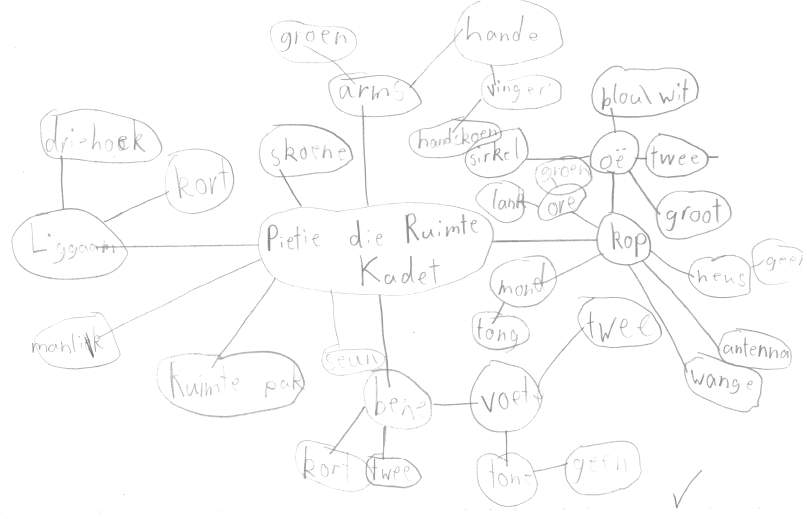
The boys draw their own Bubble Map (one of the eight Thinking Maps) to find the Afrikaans words to describe their monster in as much detail as possible. Although I am available to help them with words it is wonderful to watch them making use of all the resources I have provided for them. I then assess their Bubble Map and then they are ready to start writing their speech.

An example of a Bubble Map
We have all experienced that initial writer's block and for this reason, I get all the boys to start their speeches in the same way:

"My monster se naam is ___________. Hy is manlik / 'n seun. Sy is vroulik / 'n meisie."
(My monster's name is ___________. He is male / a boy. She is female / a girl.)

I then let them get on with the writing. Some of the boys write very short speeches and others go into great detail describing their monsters. The best part is that each boy writes his own speech in Afrikaans and experiences a feeling of achievement. I then assess their writing and make any necessary corrections.

An example of a Speech

The parents are still part of the process as I ask them to help their son finalise his key cards and practise saying the speech. The boys are then ready to present their speeches to the class. Each boy asks a friend to record them while they are saying their speech to the class. While I am finalising my assessment of their speech, they upload the recording to Google Classroom. This recording is then saved to their Classroom folder in Google Drive. They are able to show the recording to their parents and I am able to review their speech if needed.

This quote from an email from a mom of one of the boys I teach sums up that although the whole process is rather time-consuming - it is so worth it.

"When I picked up my son from school yesterday I asked him how his speech went and he said 'it was such fun!' To hear that made my day - doing speeches is daunting enough and to do them in a language other than your first is just scary. I'm so delighted that he enjoyed himself and I really wanted you to know that too." 

Tuesday, 27 June 2017

Quizlet Teacher Ambassador - The New Quizlet Learn

All my boys will tell you that I am passionate about Quizlet so, in February 2017, when I received an invitation to join the "Quizlet's Teacher Ambassador Program" I jumped at the opportunity and excitedly became a "Quizlet Teacher Ambassador".


As a Quizlet Ambassador I receive emails at least once a month with requests to share resources, participate in new feature testing, give feedback, create content for the Quizlet blog and more. One of the new features that I have been introduced to is the New Quizlet Learn. This feature has been developed in order to help students prepare for upcoming tests.

So how does it work? Firstly, this feature is available on the Quizlet app which can be downloaded from the Apple App Store or Google Play. You will not find it on the web based version of Quizlet. All students need to do is open the study set I have assigned them either using the link I post on Google Classroom or directly from their Quizlet Class. They then tell Quizlet when they need to know the material by, and Quizlet Learn will kickstart their studying with an adaptive plan that charts their progress, helps them stay motivated with encouraging checkpoints, and keeps them on track with helpful study reminders. The Old Learn is still available, Quizlet has just renamed it as Write.

Here's a quick video overview of what the New Quizlet Learn is all about.


Sunday, 4 June 2017

Google For Mummies & Daddies


Being a mummy or a daddy to a "Google-literate" school going son can be a little overwhelming at times. No need to fear... "Google For DMummies & Daddies" is here. Well... maybe not a whole book but a blog post at least. 

So what do you need to know about Google as a parent of a Grade 3, 4 or 5 boy in my Afrikaans class? Let me break it down into 3 main points. 

#1

St Peter's is a "G Suite for Education" school which means your son has access to the following:

#2

Each time your son works within Google, irrespective of the device, he needs to sign into his account. He does this by opening the Chrome browser and clicking on "Sign in" which can be found at the top right hand side of the page. He needs to remember to use his St Peter's email address and Login.  
If he is sharing a device, he needs to remove any other accounts each time he signs into Google. This is not necessary if he is using a personal device at home, as he can remain signed in. Once he is signed in all information saved to his Drive as well as all the G Suite for Education Services are accessible. 

#3

I always teach my boys to sign into Classroom as soon as they have signed into Google because that is where I post all the information they need for Afrikaans. It is very easy if they are already signed into Google as the device links the information. All they need to do is open the Classroom app or open a Classroom tab. They then select their Afrikaans classroom. I post announcements, assignments and questions in Classroom. Boys can check when they are writing the next test as well as what will be assessed. They can click directly from Classroom to any site I would like them to visit whether it be Quizlet, Quizizz, Kahoot or a Google Document, File or Folder. The options are infinite. Boys can complete assignments and tests at home if they are absent from school. Classroom also provides the boys the opportunity to comment. This is one of my favourite features as it is a safe introduction to social media. I see all their comments and I am able to reply. I have noticed that often before I have replied another boy in the class has replied. This is a wonderful example of peer support and teaching. 

Thursday, 27 October 2016

EdTechTeam South Africa Summit


After following last year's 2015 South Africa Summit on Twitter, I was thrilled that this year St Peter's gave me the opportunity to attend the 4th Annual EdTechTeam South Africa Summit featuring Google for Education in partnership with Dainfern College and Cloud Ed. The summit was a two-day high-intensity event focused on deploying, integrating and using Google Apps for Education (and other Google tools) to promote student learning.

Let the fun begin... with my colleague and good friend Monique Egbers.

All the presenters were Google for Education Certified Innovators, Google for Education Certified Trainers, Google Employees or teachers with local successful stories. The keynote speakers were:


I was in awe of the wealth of knowledge and experience of these three speakers. By the end of the summit I felt a little like a groupie hanging on to their every word. 

Holly Clark (@HollyClarkEdu) was the opening keynote speaker. Her keynote on "Disrupt Education" was inspirational. She spoke about how various successful companies had disrupted the norm such as Uber disrupting the taxi industry. She challenged us to be the "Uber" in our classrooms. Just as children binge watch television series, we need to get them to binge learn. Unfortunately education values answers not questions - which is absurd... but true. The average four year old asks around 300 questions a day - at five this drops to 50. What happens at five years of age? They start formal education. We need to foster a culture of questioning in our schools. We have to stop being "the comfortable experts and become restless learners". We need to stretch our students "to think, question, pursue and create to take agency and ownership of their learning". I loved her use of the term "combinatorial" - "what you need to teach combined with what kids want to do". 

The Breakout EDU (@breakoutEDU) session was facilitated by Ben Friesen (@benjaminfriesen). What an experience! Breakout EDU games teach critical thinking, teamwork, complex problem solving, and can be used in all content areas. 


We began the game as a group of strangers who all had with something to do with education and ended as a team excited by the possibilities Breakout EDU provides. I am just a tad competitive so I loved the fact that I opened the first lock but the best part of the experience was that the unlocking of each lock was a combined effort.

First lock opened!

One more lock to go.

Success!

We broke out!

Not only were the sessions that Ken Shelton (@k_shelton) presented brilliant, I also thoroughly enjoyed his keynote on "Transformational Teaching and Learning With Technology". He spoke about companies that had transformed their industries. MTV transformed music (the first song and video ever on MTV was "Video killed the Radio Star"). YouTube revolutionised entertainment. Uber is in the process of launching their first "self-driving" cars. The next step is "Skyuber". iPhone and iPad transformed communication because they were more than just a phone. Nokia missed out on learning- it didn't change! We need to be transformational in our teaching - "don't be a first year veteran 30 times... be a 30 year veteran once". 

Ben Friesen (@benjaminfriesen) ended the summit with his keynote, "The Journey". I found my new favourite quote during his keynote that epitomises my life.


I would like to thank everyone involved in the 4th Annual EdTechTeam South Africa Summit. Congratulations to Anthony Egbers and his team for organising a phenominal summit. Hopefully I will be able to attend next year's summit to be held in the Cape. 

My groupie photo with Ken Shelton and Holly Clark.

Tuesday, 25 October 2016

Parent Tech Talk


On Monday 17th October 2016 I hosted a Parent Tech Talk for the parents of the boys I teach in Grade 3, 4 and 5. The talk was well attended and I was impressed to see how many parents were keen to find out what they needed to know about tech in order to support their sons. At the end of the talk I promised to publish my presentation onto my blog for those at the talk as well as those who were unable to attend. Please click on the link below to view the presentation:

Tuesday, 26 July 2016

Kahoot Krazy

As a teacher, you always know when your "kids" have enjoyed a lesson when they ask you at the beginning of every lesson that follows whether they can repeat that lesson. Kahoot is that lesson. Ever since I introduced Kahoot into my Afrikaans classroom at the beginning of the year, every time I enter a Grade 3, 4 or 5 classroom someone is sure to ask, "Can we do a Kahoot today?"


What is a Kahoot? Kahoot is a free game-based learning platform that makes it fun to learn - any subject, in any language, on any device, for all ages. One of the best things about Kahoot is that it encompasses so many aspects of boys best practice:
  • competition
  • movement
  • time limits
  • active involvement
  • chaos

So how does it work? Firstly, I create a Kahoot which is set of multiple choice questions. A helpful feature is that videos, images and diagrams can be added to the questions to amplify the engagement. There is an option to use an existing Kahoot as is or to edit the questions to suit your needs. As an Afrikaans teacher, I always set my own Kahoots as there are not that many Afrikaans Kahoots and those on the site do not suit my needs.

The next step is to play the game with my class. No sign up is necessary which makes it incredibly easy to play with a class. I log into my account and select the Kahoot I would like the class to play. There are then two options:


I usually select the Classic mode as I am fortunate enough to have access to a full set of iPads so that each boy can work on his own iPad. My boys then type "kahoot.it" into their search bar, type in the game pin (which I have projected on the screen), enter their nickname and they're ready to start.

I recently discovered that a YouTube link can be added to the set of questions so that while the boys are joining the game they can listen to a chosen YouTube link. The actual video plays in the background of the screen. As I use Kahoot when teaching Afrikaans I usually add an Afrikaans music video to the Kahoot. In this way the boys are being exposed to Afrikaans music. It also makes the sign up process far more enjoyable as the boys end up singing along... and dancing too!

I control the game from my computer and all the questions and answers appear on the screen. The boys choose the answer they think is correct and click on the corresponding button on their iPads. When setting the Kahoot I have the ability to decide how much time should be given to answer each question. Once the time is up or all the players have answered the question, the stats for that question appear on the screen showing how many players chose each of the four answers. I can then click onto the next screen which shows the leader board. I then decide whether I want to discuss the question or move onto the next question.

At the end of the game, I always give the players who feature on the leader board a sweet. It still amazes me how hard boys will work to get a little sweet. The boys also get a chance to evaluate the Kahoot they have just played.

I have used Kahoot to consolidate vocabulary as well as to introduce new vocabulary. The best part of using Kahoot in the classroom is that all the boys are actively involved, having fun and learning at the same time!

Wednesday, 24 February 2016

Quizlet

Quizlet is a free website providing learning tools for students, including flashcards, study and game modes. Last year I introduced Quizlet to the boys in all three of the grades I teach in order to help them prepare for spelling tests in a fun and interactive manner. All of the material is user-generated so each time we cover new vocabulary I create a new study set of words for the boys. With six different activities, the boys can study on their own, compete for high scores and test themselves. The website can be accessed from the browser of any device and there are also free mobile apps for iPhone, iPad and Android devices. 


As many studies have shown boys love competition and this website allows the boys to compete against each other. Up until now the boys have been working anonymously. In order for their efforts to be recorded they need to be logged on to the site. When researching the site I was very pleased to see that the designers have a different setting for children under 13. For members under 13, Quizlet has removed access to social sharing features like Facebook and Twitter. Boys can search for classmates, teachers, and friends by Quizlet username in the search box to find their study materials but their real names will never be used on the site. The website provides many pictures that the boys can use for their profile picture but they cannot upload their own image for their profile picture if they are under 13.

I will be signing the boys up over the next couple of weeks. When the boys' accounts are created, as they are all under 13, Quizlet will ask for a parent's email address. Confirmation emails will be sent to the parents' email addresses and parents will need to confirm the accounts. Once the account has been confirmed parents have the option of tailoring their email preferences. Many parents elect to receive all emails as then they receive notifications each time a new set of words is added to their son's account. Each boy’s safety on the net is of utmost importance to us at St Peter’s and many of the websites are catering for this need. All the boys will be signing up through Google as we use Google Apps for Education. I would like all the boys to use the same format when entering their username:

first name     surname initial     grade     class     year

e.g. davidt5JA2016

In this way the boys will be able to identify each other but no one outside of St Peter’s will know who they are. 

The boys will continue to use the site anonymously until their sign up is completed. There is no need for you to register on the site. If you would like to learn more about Quizlet please click on the link below. 

Friday, 30 October 2015

Spelling Tests with Google Forms

If you watch young children playing school, the highlight of the game is when marking has to be done. In reality this is not the case. Marking can be an arduous task for any teacher. Most marking requires the skill of a teacher as many questions can be interpreted in a number of ways which means that there can be a number of different but correct answers. Spelling, however, is not one of these tasks. In a spelling test the word is either spelled correctly or incorrectly. I have always maintained that a computer could mark spelling tests... and now they can and they do.  

Introducing Google Forms! I love Google Forms. Since I started using Google Forms in June 2015, I have not had to mark any spelling tests by hand. As I teach all three classes in each of the three grades I teach - that translates to 78 spelling tests that I do not have to mark each time I set a spelling test in a grade. Work smarter not harder, is what I always say!


What does the process involve? Firstly I set out the test in Google Forms. I then customise it with my own header image, font and colours. 


I answer the test on the live form which generates a memo. I enable the "Flubaroo" Add-on which ensures that each submission is marked and an email is sent with the results to the boy's St Peter's email address. Each time a boy answers the test his submissions are recorded on a Responses Spreadsheet. This spreadsheet gives me a breakdown of each boy's answers as well as his overall mark. I can also see the low scoring questions and the average. It is essential that auto-capitalisation, auto-correction, spell check and predictive text is turned off when completing the tests. 


Tuesday, 20 October 2015

Google Classroom


At the beginning of 2015 I joined GEG Dainfern led by Anthony Egbers (@ajegbers) and Pam Macmillan (@Pam_Macmillan). GEG stands for "Google Educator Group" which is a group of teachers who meet on a regular basis to learn, share, inspire and empower each other to meet the needs of their learners through technology. I eagerly await each Saturday workshop which is held every 5 to 6 weeks. We began by learning the basics of using technology for education such as Gmail, Drive and YouTube. Now each time we meet we are introduced to new exciting apps that can be used in the classroom.

It was at the second GEG Dainfern workshop that I was introduced to Google Classroom. Wow! I was blown away by the possibilities this platform opens for teachers. Google Classroom is designed to help teachers create and collect assignments paperlessly. St Peter's is a GAfE School which means that we have registered for free Google Apps for Education and therefore Google Classroom is available to us. 


For the past few months I have been working in Google Classroom with the boys and I have just touched the surface of what can be done using this platform. I am looking forward to sharing what I have already done in Google Classroom as well as what I am planning to do. Here's to the start of an adventure together.

Sunday, 11 October 2015

Welcome to "To Learn Twice"

I have always loved technology, especially when it has added to my teaching. My latest exploration into the world of technology is "BLOGGING". I have been researching the benefits of blogging as well as the nuts and bolts of how to blog. I have been reading other educators' blogs. I have been writing posts in my head. Now it's time to "Just Blog It". So here goes...

Why you may ask do I want to blog? There are many reasons why I have decided to write my own personal blog. Firstly, I have always believed that the child, the parents and the teacher form a triangle and without good communication that triangle collapses. I teach boys and I know that when a parent asks their son, "How was school today?" the answer is usually,  "Fine". The follow up question, "What did you do at school today?" usually elicits a, "Nothing!" response. So if we rely on the boys to communicate, parents may never know anything. A blog solves this dilemma as now parents can ask specific questions about what has been done at school where a, "Fine" or "Nothing" response cannot be used.

Secondly, education has changed and is changing on a daily basis. Most parents were educated in a traditional pen and paper manner of instruction. Even if parents use technology in their present jobs, they weren't exposed to it at school and as such often have no idea what is going on in the new technology based classroom. My aim will be to help parents understand what is going on in the classroom and more importantly how they can assist and enjoy the experience together with their children.

Thirdly, our lives are so busy. My husband receives an average of 80 to 160 new emails every day, sometimes more. Nobody has time to read all their emails and the last thing parents need is another email from their son's teacher. A blog gives parents the choice to visit the blog and decide whether they want to read a post or not. Of course, I would love you all to subscribe to my blog but please do not feel obligated to subscribe. If you do subscribe I recommend that you create a "To Learn Twice" folder in your inbox with a rule that all notifications are sent to that folder. In this way "To Learn Twice" emails will not clutter up your inbox and when you have time (ha ha) you can open the folder and choose which post you would like to read. If you do subscribe you will have the opportunity to comment on the posts that are published. If I do publish anything that I would like all parents to read and possibly respond to, I will email that post to all parents from my St Peter's Boys Prep email address.

Lastly, I have decided to blog for a my own personal growth. The name of my blog comes from one of my favourite educational quotes by a French moralist and essayist, Joseph Joubert (1754 - 1824).


I believe that as a teacher I learn just as much from my boys each day as they learn from me. An integral part of being open to this learning involves reflection and this blog will give me the opportunity to reflect on my own teaching practice.

I look forward to reading your comments and hearing your feedback. Here's to learning twice.